Tuesday, 7 May 2019

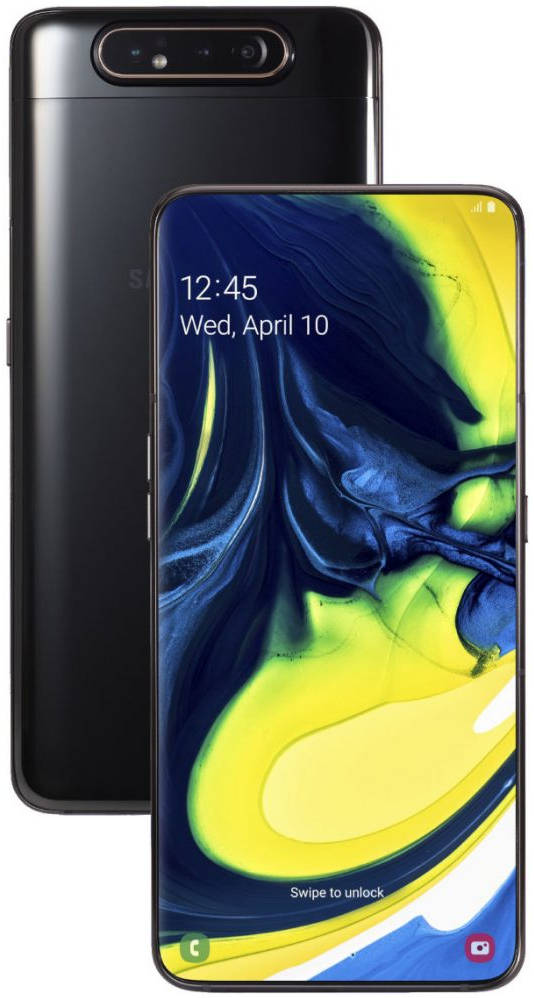
Samsung A80 Specifications and Indian Price

SAMSUNG GALAXY A80


Key Specs
Android v9.0 (Pie)
  • Performance
  • Display
  • Camera
  • Battery

RS: 45,990( Expected Price) 


SAMSUNG GALAXY A80 SPECIFICATIONS

General
Launch DateMay 16, 2019 (Expected)
BrandSamsung
ModelGalaxy A80
Operating SystemAndroid v9.0 (Pie)
SIM Slot(s)
Dual SIM, GSM+GSM, Dual VoLTE
SIM SizeSIM1: Nano
SIM2: Nano
Network4G: Available (doesn't support Indian bands)
3G: Available, 2G: Available
Fingerprint Sensor
yes
Quick Charging
yes

Design
Height165.2 mm 
Width76.5 mm
Thickness9.3 mm
ColoursAngel Gold, Ghost White, Phantom Black

Display
Screen Size
6.7 inches (17.02 cm)
Screen Resolution
1080 x 2400 pixels
Aspect Ratio20:9
Bezel-less displayyes
Pixel Density
393 ppi
Display Type
AMOLED
Touch Screenyes Capacitive Touchscreen, Multi-touch
Screen to Body Ratio (calculated)
85.76 %

Performance
ChipsetQualcomm Snapdragon 730G
Processor
Octa core (2.2 GHz, Dual core, Kryo 470 + 1.8 GHz, Hexa Core, Kryo 470)
Architecture
64 bit
Graphics
Adreno 618
RAM
8 GB

Storage
Internal Memory
128 GB
Expandable Memory
no No

Camera
MAIN CAMERA
Resolution48 MP + 8 MP Dual Primary Cameras
Autofocusyes
Physical ApertureF2.0
Flashyes LED Flash
Image Resolution8000 x 6000 Pixels
SettingsExposure compensation, ISO control
Shooting ModesContinuos Shooting, High Dynamic Range mode (HDR)
Camera FeaturesDigital Zoom, Auto Flash, Face detection, Touch to focus

Battery
Capacity
3700 mAh
TypeLi-Polymer
User Replaceable
no No
Quick Charging
yes Fast

Network & Connectivity
SIM SizeSIM1: Nano, SIM2: Nano
Network Support
4G (doesn't support Indian bands), 3G, 2G
VoLTE
yes
SIM 1
3G Bands:
UMTS 1900 / 2100 / 850 / 900 MHz
2G Bands:
GSM 1800 / 1900 / 850 / 900 MHz 
GPRS:
Available
EDGE:
Available
SIM 2
3G Bands:
UMTS 1900 / 2100 / 850 / 900 MHz
2G Bands:
GSM 1800 / 1900 / 850 / 900 MHz 
GPRS:
Available
EDGE:
Available
Wi-Fiyes Wi-Fi 802.11, b/g/n
Wi-Fi Features
Mobile Hotspot
Bluetooth
yes v5.0
GPS
yes with A-GPS, Glonass
USB ConnectivityMass storage device, USB charging
USB Type-C
yes (Doesn`t support micro-USB)

Multimedia
Loudspeakeryes
Audio Jack3.5 mm
Audio Features
Dolby Atmos

Special Features
Fingerprint Sensor
yes
Fingerprint Sensor PositionOn-screen
Other Sensors
Light sensor, Proximity sensor, Accelerometer, Compass, Gyroscope

Under RS:10000 Desktop (i5 3.2ghz Desktop pc / 8GB Ram / 500GB Hard Disk/WiFi)

Zebronics - Intel (i5 3.2ghz Desktop pc / 8GB Ram / 500GB Hard Disk/WiFi) 

Under RS:10000 Desktop (i5 3.2ghz Desktop pc / 8GB Ram / 500GB Hard Disk/WiFi) 

Product description

Desktop PC Specifications:- Intel Core i5 650 3.2ghz processor Ram 8GB DDR3, 500GB Hard Disk drive, Without Dvd writer, Zebronics cabinet (Model as per availability) Wifi,
  • Intel i5 650 3.2ghz processor
  • Ram 8GB DDR3
  • 500GB Seagate Hard disk
  • Zebronics cabinet (model as per availability)
  • Wifi, (Without dvd writer)

Product information

Technical Details
BrandZebronics - Intel
Item Height35 Centimeters
Item Width20 Centimeters
Item Weight6 Kg
Product Dimensions44 x 20 x 35 cm
Processor BrandIntel
Processor TypeCore i5-650
Processor Speed3.20 GHz
Processor Count1
RAM Size8 GB
Computer Memory TypeDDR3 SDRAM
Hard Drive Size500 GB
Hard Disk TechnologySeagate
Hard Drive InterfaceeSATA
Hardware PlatformWindows
Operating SystemWindows 10 (Unlicensed)

I Pad 2018 Review

I Pad 6 th Gen 9.7 inches

i pad 6 gen

My Review

  • I Pad 6 th Gen Is Using Was Very Smooth and Right is Cheap

Gaming Review

  • Gaming Was Very Realistic Feel and Ultra Graphics Game Play and 60 FPS
  • Fortnite Game Is Epic Graphics and Very Smooth Gameplay
  • Pubg Was Extream Level Graphics and Very Smooth Gameplay
  • 2 GB Of RAM and 32 GB Of Internal Storage

Pencile

  • The second significant addition to the 2018 iPad is Apple Pencil support. Introduced alongside the original iPad Pro, Apple Pencil combines pressure sensors in the tip with telemetry sensors and a rechargeable lithium-ion battery in the shaft to provide an experience that's both similar to but decidedly different from traditional digital stylus pens.
  • There's no eraser on the back, which I don't miss because none of the pencils I used in art school or design work ever had erasers on the back. I'm used to drawing with one hand and erasing with a gum or white eraser in the other, which is a behavior emulated by most art apps. But the pencils used in elementary school typically do have erasers on the back — for as long as they last — so kids might end up spinning the Pencil around a few times before habituating themselves to nothing being there.
  • There are also no buttons on the Pencil, unlike some other stylus pens and real-world art tools like the airbrush. I kinda wish there was something there to click on, even though I'm not sure how I'd use it. Switch from stroke to spray?
  • You can charge the Pencil by plugging it right into the Lightning port on your iPad, which a lot of internet hot-takers found silly but which anyone who's used one will tell you is a life-saver in practice: If the Pencil runs dry, without even needing to find a charger, you can top it up quickly and finish your work. I've used it on planes, in coffee shops, and even when lounging around on the sofa so often. The only downside is the cap that covers the Lightning plug — it's magnetic and can stick to your iPad when charging, but it's still super easy to lose when you've popped it off.

ChipsetSingle-coreMulti-core
iPad 6Apple A103306.5426


Key Specs
iOS v11.3
  • Performance

  • Display

  • Camera

  • Battery